미분류
[Phonegap] 인증서 에러 해결을 위한 Plugin 추가 ios
기존 모바일 웹 서비스를 안드로이드, 아이폰 앱으로 배포하라는 요청에 Phonegap 을 이용해서 배포하기로 결정 앱 실행할 때 바로 모바일웹 주소로 이동하게끔 만듬 안드로이드는 문제없이 잘되는데 아이폰은 인증서 에러때문에 페이지 로딩 안됨(SSL 인증서 문제) 구글링해보니 인증서 에러 무시하는 플러그인을 사용하라고 함 옛날 글이라 그런지 사용법대로 하니까 안됨 ㅜㅜ 삽질 끝에 해결 ㅋㅋ 폰갭 프로젝트는 만들줄 아신다고…
기존 모바일 웹 서비스를 안드로이드, 아이폰 앱으로 배포하라는 요청에 Phonegap 을 이용해서 배포하기로 결정
앱 실행할 때 바로 모바일웹 주소로 이동하게끔 만듬
안드로이드는 문제없이 잘되는데 아이폰은 인증서 에러때문에 페이지 로딩 안됨(SSL 인증서 문제)
구글링해보니 인증서 에러 무시하는 플러그인을 사용하라고 함
옛날 글이라 그런지 사용법대로 하니까 안됨 ㅜㅜ
삽질 끝에 해결 ㅋㅋ
폰갭 프로젝트는 만들줄 아신다고 생각하고 스킵
프로젝트에 보면 Plugins 폴더가 있음
그 폴더에서 마우스 오른쪽클릭
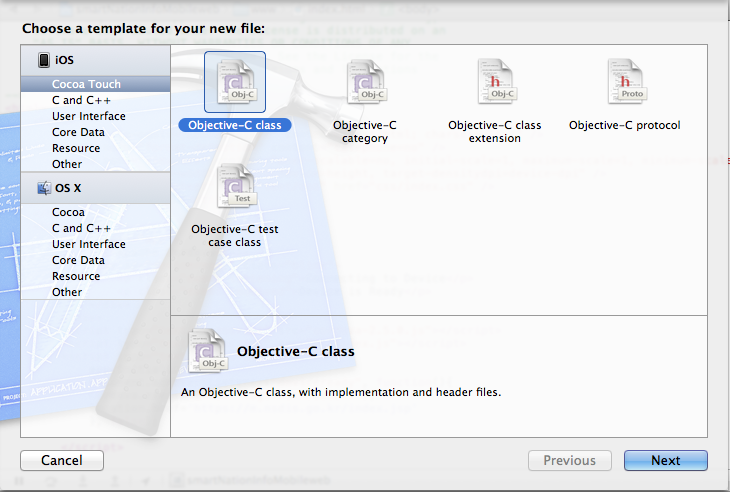
그림처럼 고르고 Next 버튼 클릭
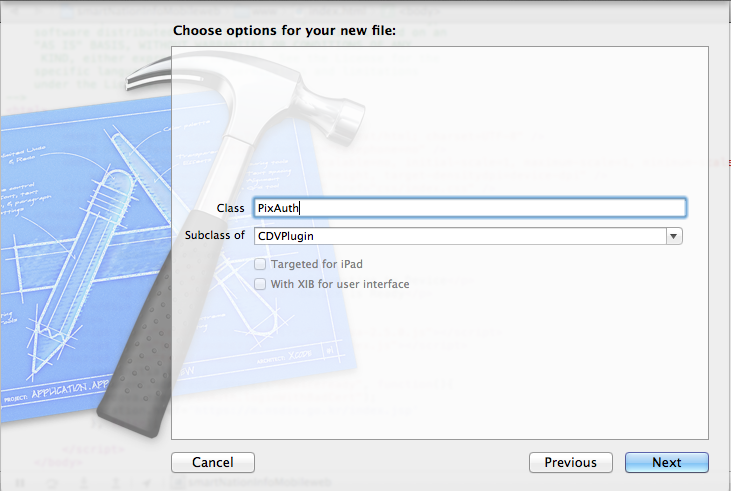
클래스 이름은 마음대로 정하고 서브클래스는 CDVPlugin 을 고르면 됨
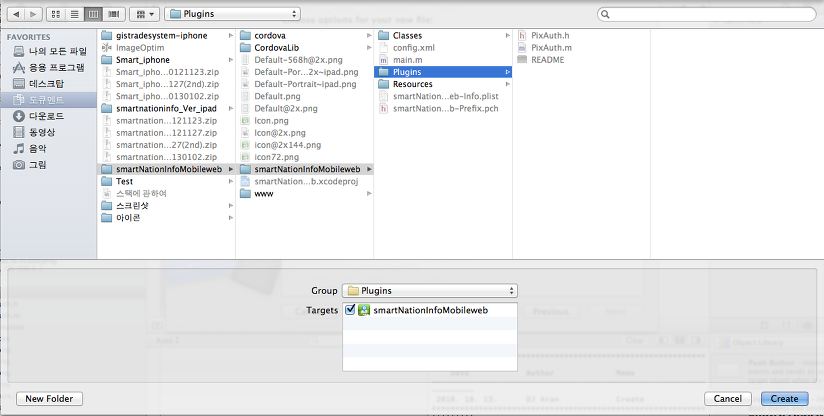
타겟 체크하시고 생성!!
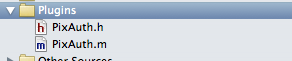
생성하고 나면 요렇게 파일이 생김
//
// PixAuth.h
// smartNationInfoMobileweb
//
// Created by Jinman Park on 13. 3. 7..
//
//
#import <Cordova/CDVPlugin.h>
@interface PixAuth : CDVPlugin {
NSURLConnection *aConnection;

NSURLResponse *connectionResponse;

NSMutableData *connectionData;
}
- (void)loginWithBadCert:(NSMutableArray*)params withDict:(NSMutableDictionary*)options;
@end
PixAuth.h 파일은 위의 소스 복사 붙이기
//
// PixAuth.m
// smartNationInfoMobileweb
//
// Created by Jinman Park on 13. 3. 7..
//
//
#import "PixAuth.h"
@implementation PixAuth
-(void) loginWithBadCert:(NSMutableArray*)params withDict:(NSMutableDictionary*)options {
NSLog(@"hahahaha");

NSURL *serverURL = [NSURL URLWithString:[NSString stringWithFormat:@"https://m.nsdis.go.kr"]];

//NSString *aaa = [serverURL absoluteString];

//NSLog(aaa);

NSURLRequest *connectionRequest = [NSURLRequest requestWithURL:serverURL

                                                   cachePolicy:NSURLRequestReloadIgnoringCacheData timeoutInterval:60.0];

NSURLConnection * aConnection = [[NSURLConnection alloc] initWithRequest:connectionRequest delegate:self];

connectionData = [[NSMutableData alloc] init];
}
/* NSURLConnection Delegate Methods */
-
(void)connection:(NSURLConnection *)connection didReceiveResponse:(NSURLResponse *)response {
NSLog(@"in didReceiveResponse ");
[connectionResponse release];
connectionResponse = [response retain];
[connectionData setLength:0];
}
-
(void)connection:(NSURLConnection *)connection didReceiveData:(NSData *)data {
NSLog(@"in didReceiveData ");
[connectionData appendData:data];
}
//
// this method, and the one below get the magic rolling and allow my ajax request
// to function as expected, even with the bogus certificate
//
-
(BOOL)connection:(NSURLConnection *)connection canAuthenticateAgainstProtectionSpace:(NSURLProtectionSpace *)protectionSpace {
return YES;
}
//
// my application requires credentials, so they are stored in the application settings
//
-
(void)connection:(NSURLConnection *)connection didReceiveAuthenticationChallenge:(NSURLAuthenticationChallenge *)challenge {
NSLog(@"in didReceiveAuthenticationChallange ");
NSURLCredential *newCredential;
newCredential = [NSURLCredential credentialWithUser:[[NSUserDefaults standardUserDefaults] stringForKey:@"emailAddress"]
                                         password:[[NSUserDefaults standardUserDefaults] stringForKey:@"password"]

                                      persistence:NSURLCredentialPersistenceNone];
[[challenge sender] useCredential:newCredential
forAuthenticationChallenge:challenge];
}
-
(void)connectionDidFinishLoading:(NSURLConnection *)connection {
NSLog(@"in connectionDidFinishLoading ");
NSString *string = [[[NSString alloc] initWithData:connectionData encoding:NSUTF8StringEncoding] autorelease];
NSLog(@"%@", string);
}
-
(void)connection:(NSURLConnection *)connection didFailWithError:(NSError *)error {
NSLog(@"in didFailWithError ");
NSLog(@"Unresolved error %@, %@", error, [error userInfo]);
}
-
(NSCachedURLResponse *)connection:(NSURLConnection *)connection willCacheResponse:(NSCachedURLResponse *)cachedResponse {
return nil; // Never cache
}
@end
PixAuth.m 파일은 위의 소스 복사 붙이기
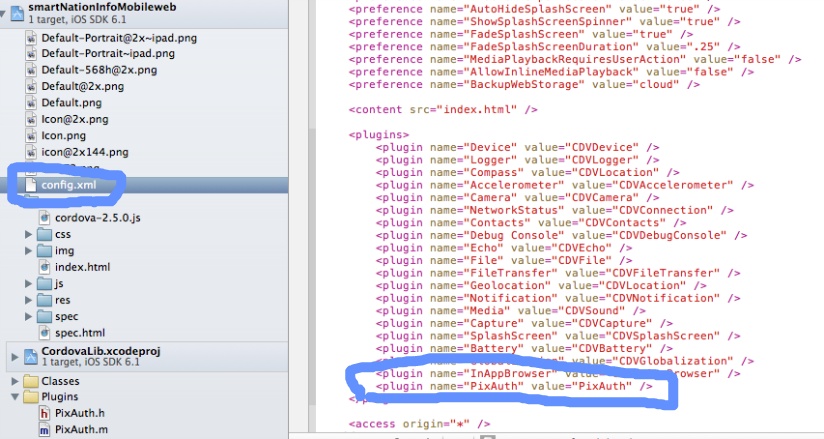
config.xml 파일로 가서 플러그인 추가
그림처럼 위에서 만든 플러그인 이름을 한줄 추가하면 됨
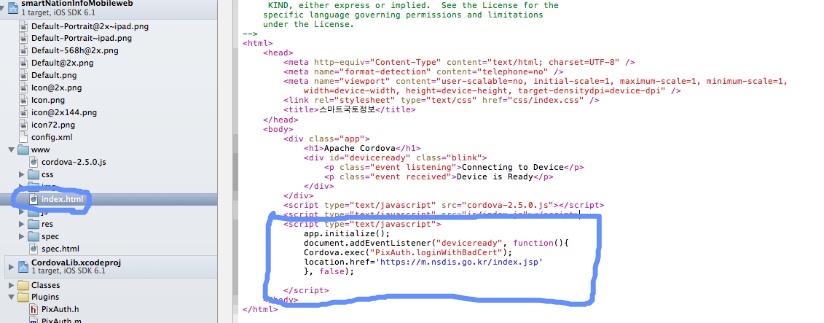
index.html 페이지에서 위 그림처럼 소스코드 추가
document.addEventListener("deviceready", function(){
        Cordova.exec("PixAuth.loginWithBadCert");

        location.href='https://m.nsdis.go.kr/index.jsp'

        }, false);
요렇게 하고나면 인증서 문제 해결 ㅋㅋ